Cronômetro
Na pasta StarterGui, adicione um ScreenGui. Dentro do ScreenGui vamos adicionar:
- Um script e renomeá-lo para Ativador;
- Um BoolValue e renomeá-lo para RodandoTimer;
- Um StringValue e renomeá-lo para tempoFinal;
- Um TextLabel, e colocar dentro dele outro script.
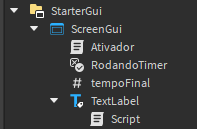
Código que vai dentro do script Ativador:
local ReplicatedStorage = game:GetService("ReplicatedStorage")
local bindableEvent = ReplicatedStorage:FindFirstChild("Timer1")
local gui = script.Parent
local timer = gui:FindFirstChild("RodandoTimer")

bindableEvent.Event:Connect(function(playerName, status)
	local player = gui:FindFirstAncestor(playerName)
	if player.Name == playerName then
		if status == "PararTimer" then
			timer.Value = false
		end

	end
end)
Código que vai no script dentro do TextLabel:
local text = script.Parent
local gui = text.Parent
local player = gui.Parent.Parent
local timer = gui:FindFirstChild("RodandoTimer")
local tempo = gui:FindFirstChild("tempoFinal")
local tempoInicial = DateTime.now()
local minutos = tempoInicial:FormatLocalTime("mm", "en-us")
local segundos = tempoInicial:FormatLocalTime("ss", "en-us")
local milissegundos = tempoInicial:FormatLocalTime("SSS", "en-us")

timer.Value = true

while timer.Value == true do

	local tempoRodando = DateTime.now()
	local minutosR =  tempoRodando:FormatLocalTime("mm", "en-us") - minutos
	local segundosR =  tempoRodando:FormatLocalTime("ss", "en-us") - segundos
	local milissegundosR =  tempoRodando:FormatLocalTime("SSS", "en-us") - milissegundos

	if milissegundosR < 0 then
		milissegundosR = 1000 + milissegundosR
		segundosR = segundosR - 1
	end
	if segundosR < 0 then
		segundosR = 60 + segundosR
		minutosR = minutosR - 1
	end
	if minutosR < 0 then
		minutosR = 0
		segundosR = 0
		milissegundosR = 0
	end
	tempo.Value = minutosR .. ":" .. segundosR .. ":" .. milissegundosR
	text.Text = tempo.Value
	wait(0.001)

end

local pontos = player.leaderstats.Tempo
pontos.Value = tempo.Value

text.BackgroundColor =  BrickColor.new("Lime green")
Após isso, vá para ServerScriptService, crie um script e mude o nome dele para Pontuação
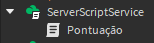
Código para colocar dentro de Pontuação:
local Players = game:GetService("Players")
local gui = game:GetService("StarterGui")
local pontuacaoFinal = "---"

local function onCharacterAdded(character, player)
	player:SetAttribute("IsAlive", true)
	local humanoid = character:WaitForChild("Humanoid")
	-- Se não quiser que a pontuação do jogador zere quando ele morra, delete esse pequeno bloco de texto abaixo.
	humanoid.Died:Connect(function()
		local points = player.leaderstats.Points
		points.Value = 0
		player:SetAttribute("IsAlive", false)
	end)
end

local function onPlayerAdded(player)
	local leaderstats = Instance.new("Folder")
	leaderstats.Name = "leaderstats"
	leaderstats.Parent = player

	local points = Instance.new("StringValue")
	points.Name = "Tempo"
	points.Value = pontuacaoFinal
	points.Parent = leaderstats

	player:SetAttribute("IsAlive", false)

	player.CharacterAdded:Connect(function(character)
		onCharacterAdded(character, player)
	end)
end

Players.PlayerAdded:Connect(onPlayerAdded)

local function OnScoreSubmit(score)
	onPlayerAdded()

end
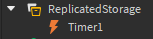
Na pasta ReplicatedStorage, adicione um BindableEvent e o renomeie para Timer1
Por fim, crie um bloco e o coloque no mapa onde preferir. Nele, crie um script
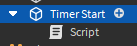
Script do bloco:
local ReplicatedStorage = game:GetService("ReplicatedStorage")
local bindableEvent = ReplicatedStorage:FindFirstChild("Timer1")

script.Parent.Touched:connect(function(hit)
	if hit and hit.Parent and hit.Parent:FindFirstChild("Humanoid") then
		local player = game.Players:GetPlayerFromCharacter(hit.Parent)
		bindableEvent:Fire(player.Name, "PararTimer")
	end

end)